
How to Easily Generate an FDA Prior Notice
If you have ever shipped food, supplements, medication or cosmetics into the United States, you know how stressful the process can be.
This stress is due to the FDA Prior Notice requirement. Imagine managing 10 separate food or medication shipments: traditionally, you would have to log onto the US Food and Drug Administration website and manually fill out more than 20 complex fields for each individual shipment just to certify that your items are safe to consume or use in the United States.
When you multiply that repetitive data entry by 10 shipments, it becomes a massive drain on your time and operational efficiency.
But not anymore. With Terminal Africa, you can now generate an official FDA Prior Notice in just under 3 minutes.
How to Easily Generate an FDA Prior Notice for Shipping to the USA
Consider the following steps to seamlessly complete your documentation and get your shipment moving.
Step 1: Start a New International Shipment
Log into your Terminal Africa dashboard. If you don't have an account yet, you can click here to create a free account. Once logged in, initiate a new international shipment bound for the United States.
Step 2: Enter Sender and Receiver Addresses
Accurately fill in the origin and destination details. Add your name, business address, phone number, and email as the sender. Next, enter the precise delivery address, name, and contact details of your receiver or buyer in the USA.

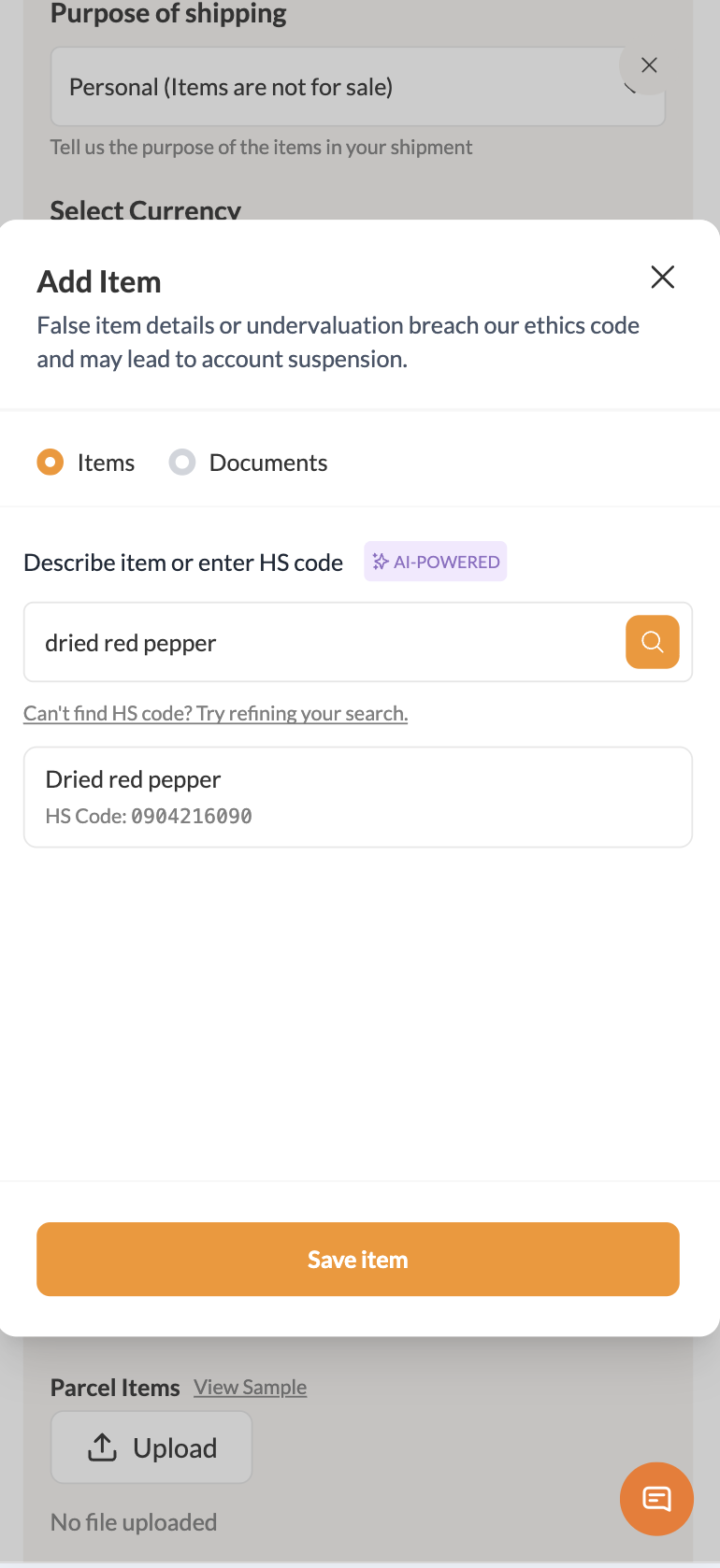
Step 3: Describe Your Item with the AI HS Code Generator
Properly classifying your item is crucial for customs clearance. Instead of guessing complex harmonised system codes, use the integrated Terminal Africa HS Code Generator. Simply type in a clear, straightforward description of your item (e.g., "Dried Hibiscus Flowers" or "Organic Shea Butter Soap"), and the AI tool will instantly assign the exact HS code required by international customs.
Step 4: Add Package and Manufacturer Details
Next, input the standard package metrics as you normally would:
- Weight & Dimensions: Ensure these are accurate to prevent pricing discrepancies.
- Quantity & Value: State the exact number of items and their commercial value.
- Manufacturer’s Details: Input the registered name and facility address of the entity that produced the food, supplement, or cosmetic item. This is a mandatory requirement for FDA filing.

Step 5: Select a Carrier and Complete Booking
After entering your shipment parameters, Terminal Africa will display a list of available global courier partners alongside their respective shipping rates and estimated delivery times. Choose the carrier that best fits your budget and timeline, select your preferred drop-off or pickup option, and complete the booking payment.

Step 6: Instantly Access Your FDA Prior Notice
Once your booking is confirmed, return to your dashboard after a few minutes and refresh the page. Terminal Africa automatically handles the FDA filing backend for you.
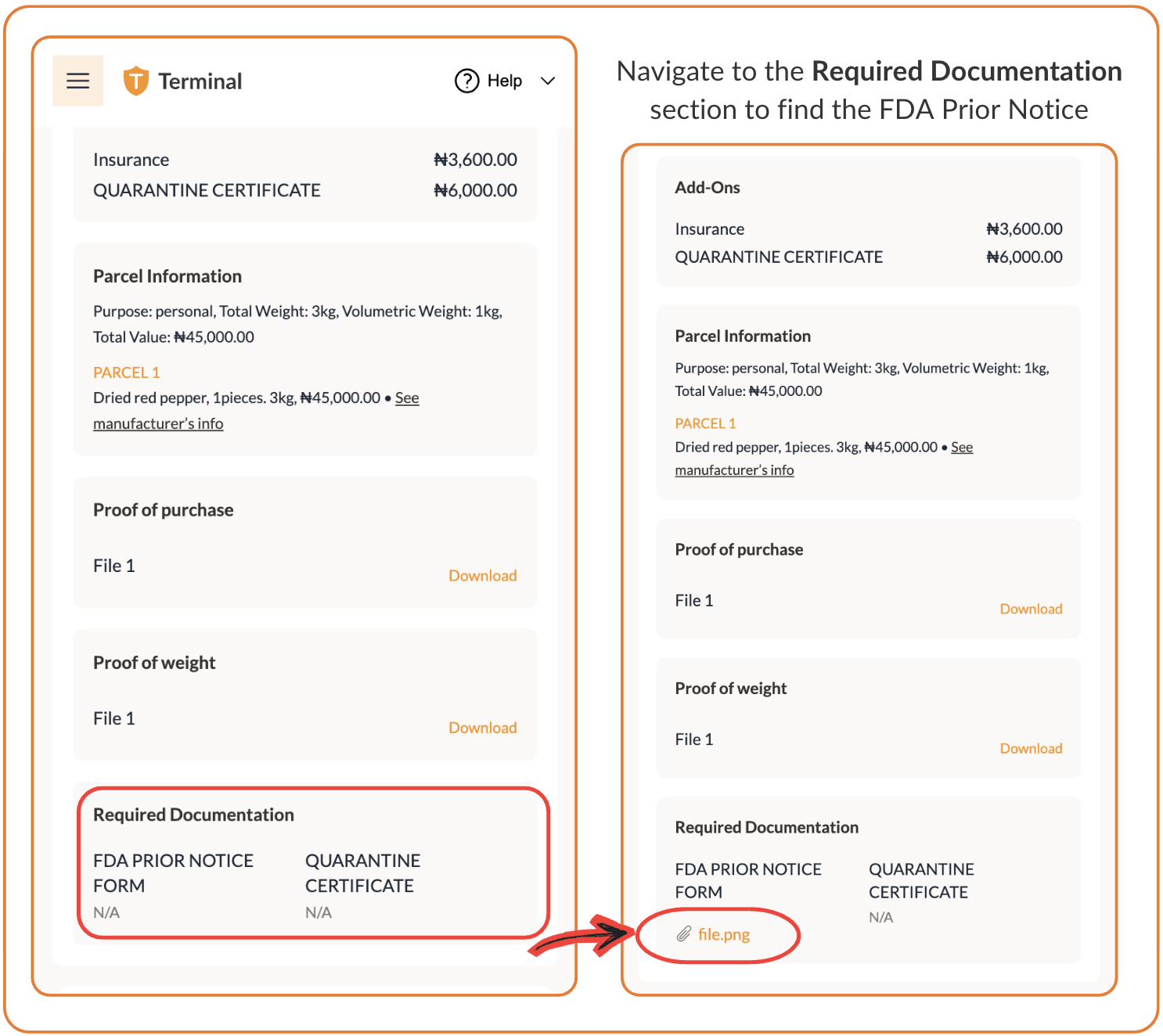
Within moments, your official FDA Prior Notice certificate will be generated and attached directly to your shipment.
Simply download and print the document along with your shipping waybill, attach them securely to your package, and hand it over to the carrier.
More Like This

How to Schedule a Pickup for Your Shipment

How to Send Clothes from Port Harcourt to Canada
How to Get Documentation for International Shipping

Have further questions?
Contact Us