
Over the years, Terminal Africa has focused on making shipping more simple, predictable, and transparent for businesses. We build our platform around the challenges our customers face, from booking shipments to managing delivery costs.
One of those challenges is weight discrepancies. This occurs when the weight or dimensions declared during booking differ from what the carrier measures, which can result in additional charges.
To help reduce these discrepancies, we updated your shipment booking process.
What’s Changed?
Previously, while booking a shipment, you select a saved packaging size from a dropdown menu. You also had to determine if your parcel’s actual weight or volumetric weight was higher.
Now, the new booking flow lets you enter the dimensions of the package.
You select the packaging type that matches your parcel, then enter its length, width, and height. Then, you add the items in your shipment and enter the parcel’s actual weight.
Afterwards, our platform will automatically compare the actual and volumetric weights and use the higher one to calculate your shipping rate.
A Quick Look at the New Booking Flow
Let’s look at the booking process using an example.
Step 1: Start a New International Shipment
Log in to your Terminal Africa account and start a new international shipment.
Step 2: Enter the Sender & Receiver’s Details
Add the sender’s name, address, phone number, and email. Then enter the recipient’s details.
Step 3: Add Your Parcel Details
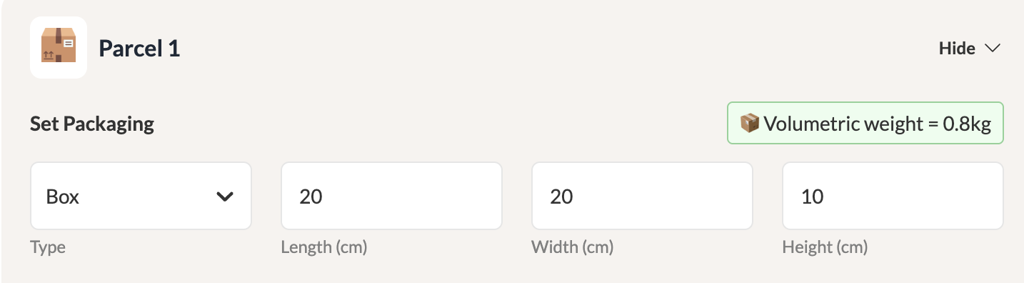
Under Parcel 1, select Box and enter your packed parcel’s dimensions:
20 cm × 20 cm × 10 cm
Our platform calculates the 0.8 kg volumetric weight automatically.
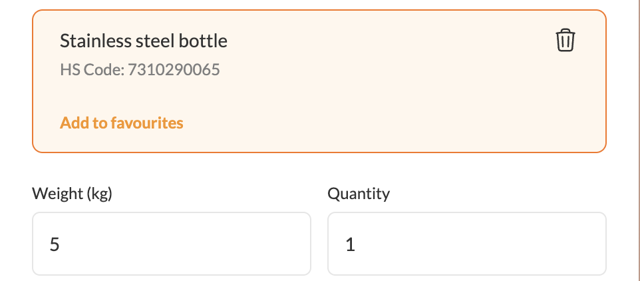
Then add item, search for the HS code, and enter the actual weight.
Terminal compares both weights and uses the higher weight as the billable weight.
Step 4: Select a Carrier
Once you enter your parcel details, Terminal shows you available carriers and shipping rates.
Choose the carrier that works best for your shipment based on price and delivery speed.
Step 5: Review Your Documents
Review the documents required for your shipment. For example, shipments containing clothing to the US or Canada require a Textile Declaration. We’ll handle the required documentation for you.
Why We Made This Change
By entering your parcel’s actual dimensions and weight:
- You get a more accurate shipping rate.
- It reduces the occurrence of weight discrepancies after booking.
- We calculates the volumetric weight automatically.
- Consistent parcel dimensions are recorded on the platform.
- The correct shipment information is passed to carriers.
What You Need to Do
Before booking your shipment, make sure your parcel is properly packed, then measure and weigh it.
When booking on Terminal:
Select your packaging type → Enter your dimensions → Add your items and actual weight → Let Terminal calculate the rest.
The update is now live. Visit terminal.africa to and try the new booking flow!

%20(1)%20(1).jpg)